
For salons, studios, clinics, practices and classes
Online booking on your WordPress site, with no commission
Clients choose a service and a time, can pay you ahead by bank transfer, and reschedule from the link in their confirmation. Nevua takes no commission per booking, and your data stays on your site. On PRO: Stripe and PayPal payments, deposits against no-shows, and WhatsApp and SMS reminders.
Launch offer: a lifetime PRO license for the first 90 days. See pricing
Complete free version on WordPress.org · English, Spanish and Portuguese
For your clients
Clients book in a few steps, on a phone or a computer
The basics are picking the service, the day and the time and leaving the details. Other steps appear depending on what you turn on: your own questions and, on PRO, the location, the professional, a session package and online payment.
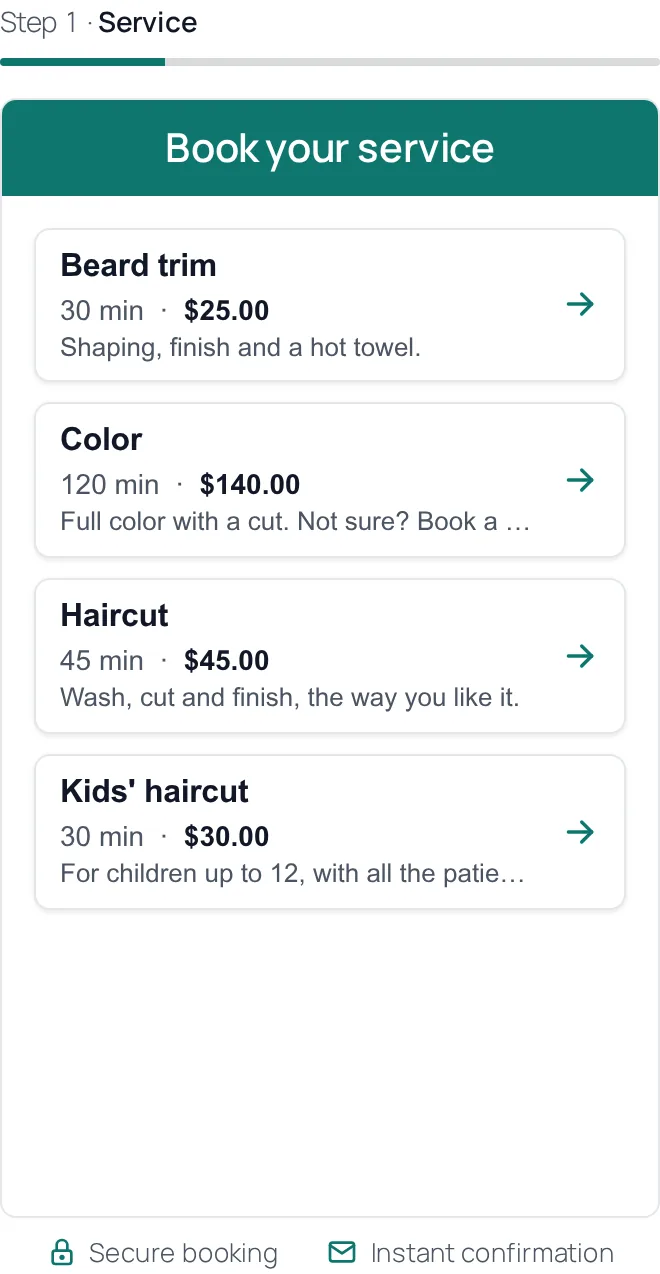
1. Pick a service
Sees each service’s length and price, in your currency.
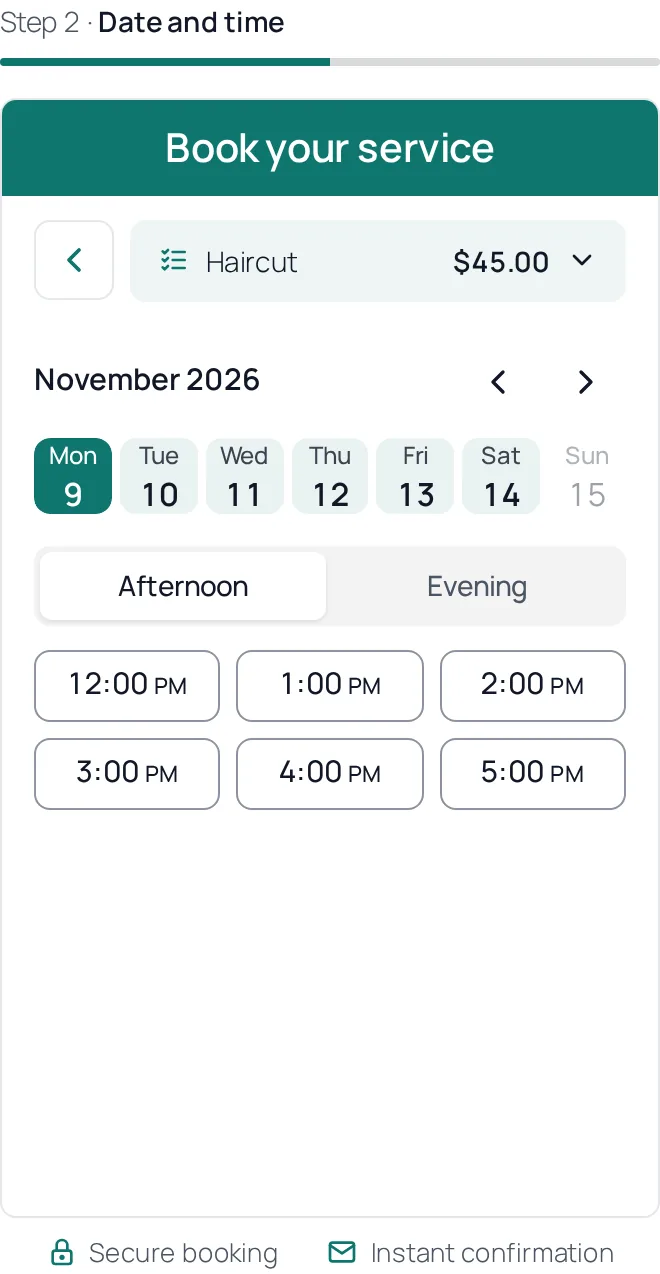
2. Pick a day and a time
Only free times show up, within your working hours and the notice you set.
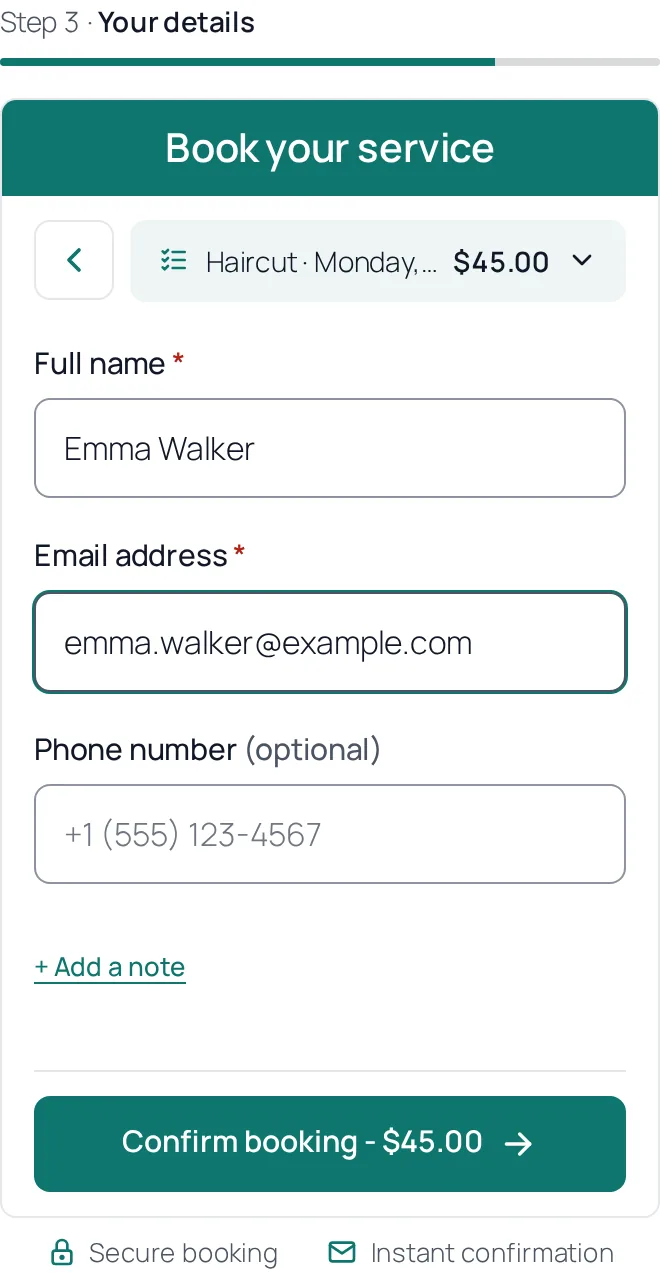
3. Leave a name and an email
No account needed. The confirmation comes with a calendar file and a link to reschedule or cancel.
Try it
Make a test booking
This is the Nevua Free booking form, the same one that goes on your site, with two sample services and two sample questions. Pick a service, a day and a time and fill in the details to see the whole flow.
It’s a demo: no email is sent, and the booking is deleted within half an hour. Use a made-up name and email.
Payments
Ways to get paid
In the free version
- At the visit: cash, card or bank transfer, the way you already take payment. You record on the booking how it was paid.
- Ahead, by bank transfer (or Pix, in Brazil): the client sees your bank details on the confirmation, in the email and on the booking’s page, and you mark the booking paid.
On PRO
- Card through Stripe, with Apple Pay and Google Pay when they’re turned on in your Stripe account.
- PayPal.
- Mercado Pago, for Latin America (with Pix in Brazil).
- The whole price or just a deposit, set on each service.
- Refunds with one button on the booking.
Nevua takes no commission on payments. Stripe, PayPal and Mercado Pago charge their own fees, on your own account.
For you
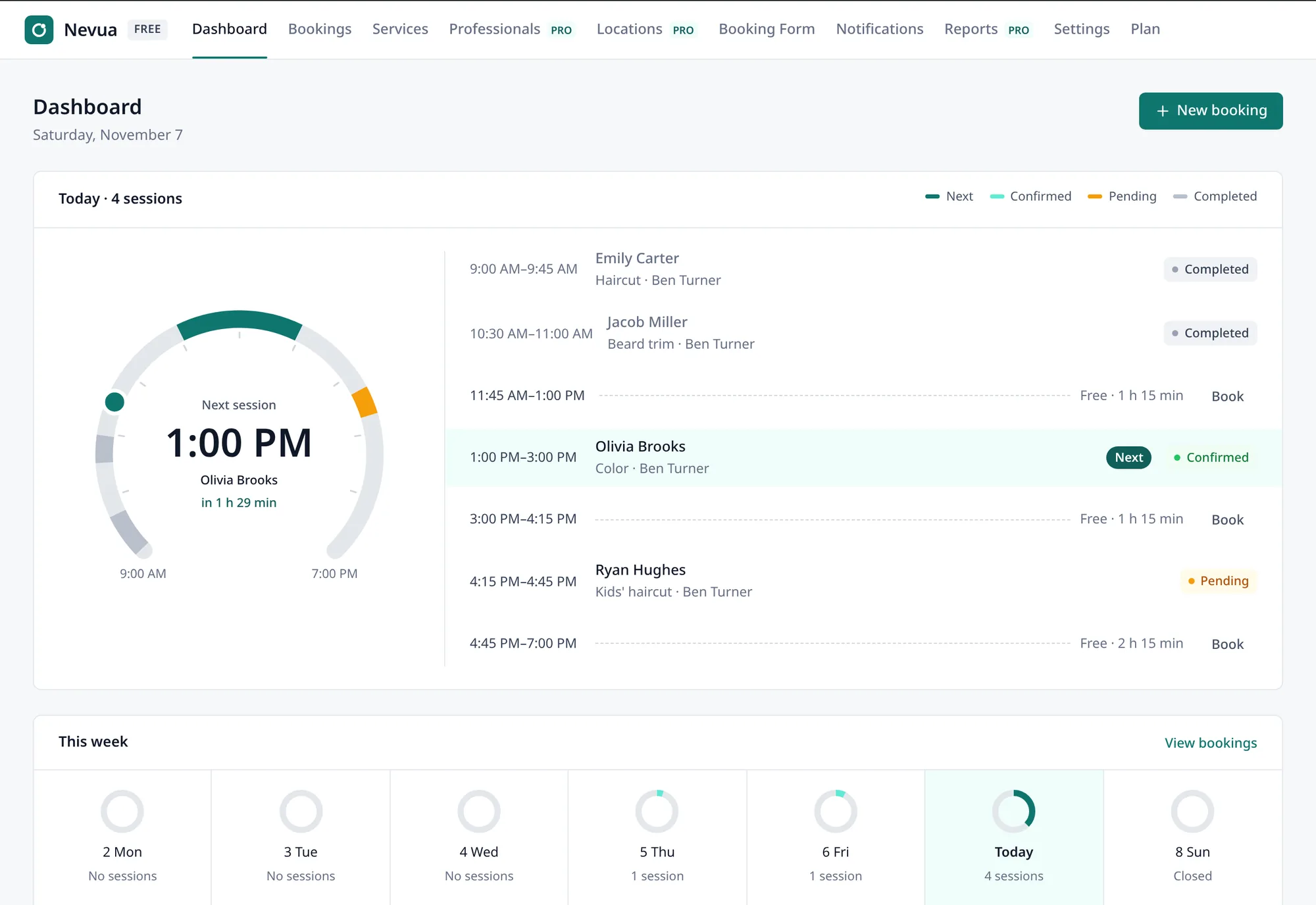
Your whole schedule in the WordPress dashboard
The day on the Dashboard
Today’s bookings laid over your working hours, the times still free and how full each day of the week is.
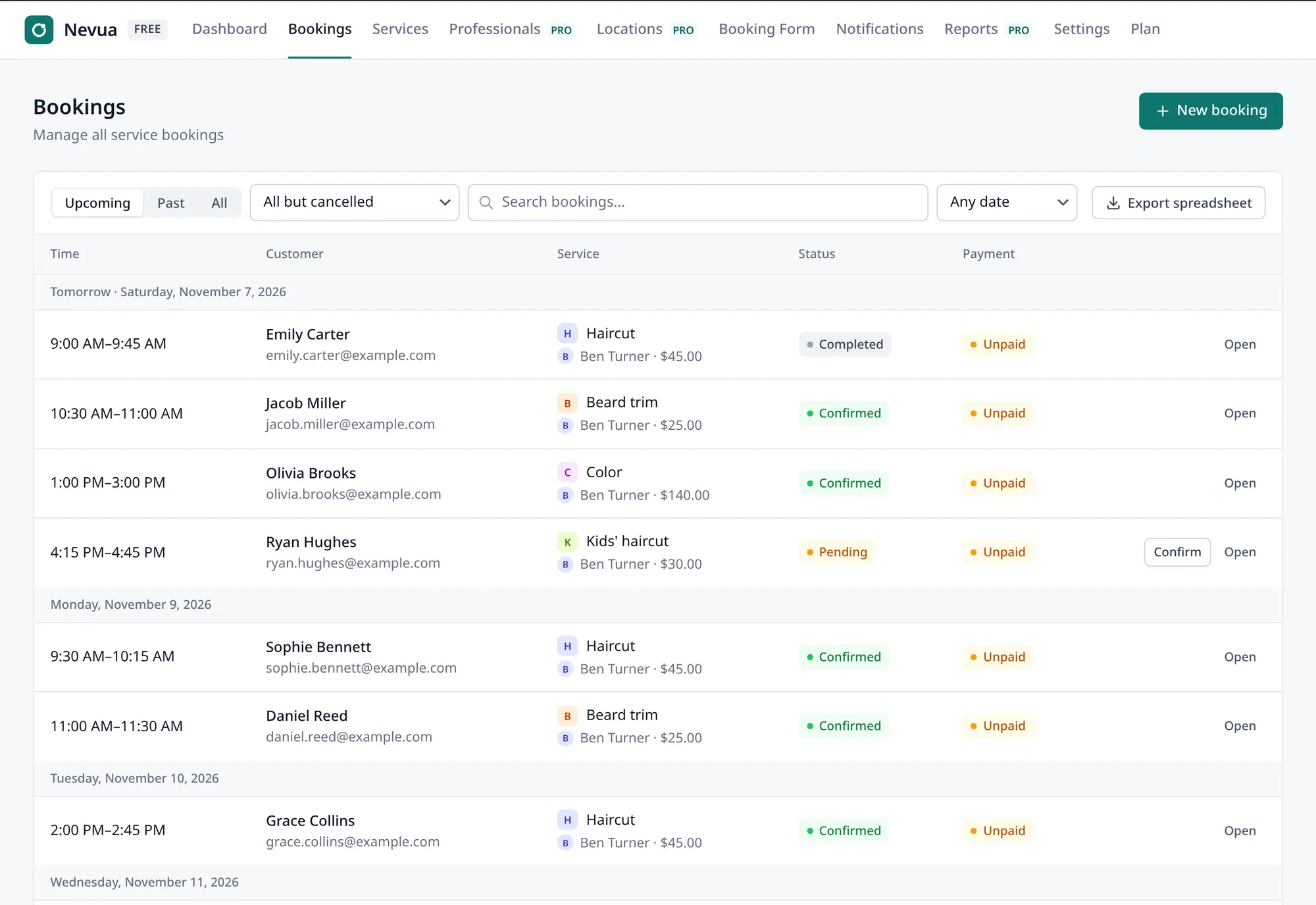
The bookings list
Upcoming bookings come first, grouped by day. Confirm, reschedule, cancel, or record who came and who didn’t. Book clients yourself, including those with no email, and export any period as a spreadsheet.

A booking form in your brand’s colors
Choose the template, color, font, corners and questions, with a preview of the real form. It goes on any page with the block or the shortcode, uses your theme’s font and fits the available width, from a full page to a sidebar.
Free
What the free version includes
Services and hours
Length, price and a break between appointments. Hours for each weekday, breaks such as lunch, days off, and how early and how far ahead clients can book.
Automatic or manual confirmation
Your choice. With manual confirmation, the client is told the request arrived, then gets the confirmation.
Automatic emails
Confirmation with a calendar file (.ics), a reminder that asks the client to confirm they’re coming, cancellation, and a notice for you on each new booking.
Clients reschedule and cancel
From the link in their email, with no account, up to the notice you set.
Pay at the visit or ahead
Show your bank details (or your Pix key, in Brazil) for clients to pay ahead, and record the payment on the booking, with how it was paid.
Custom fields
Ask what you need to know. Phone numbers and tax IDs are masked, and the email is validated in the form and on the server.
Protection against bots
An invisible check blocks bots without asking the client anything, and each visitor has a limit on bookings per minute.
Privacy
A client’s bookings are included in WordPress’s export and erase personal data tools. Everything stays in your database.
Three languages
English, Spanish and Portuguese, in the dashboard, the form and the emails. Tax IDs from Brazil, Mexico, Argentina, Chile, Colombia, Peru and Uruguay are checked.
Nevua PRO
Nevua PRO: online payments, a team and messaging
PRO features aren’t needed to take bookings. They’re for charging online, working with a team and messaging clients on WhatsApp and SMS.
Fewer no-shows and empty slots
A deposit paid online holds the time and is refunded if the client cancels in time. Reminders and attendance confirmation also go out by WhatsApp and SMS. And the waitlist tells whoever is waiting the moment a time opens.
Online payments and refunds
Stripe, PayPal and Mercado Pago: clients pay as they book, and the money goes to your own account with each service. To give a payment back, one button on the booking does it.
Video sessions and teams
Every booking of an online service gets its own Jitsi (free), Google Meet or Zoom link, sent to the client with the confirmation. Plus several professionals with their own schedules, branches or rooms, and Google Calendar and Outlook sync.
Also on PRO: session packages, receipts, weekly series of bookings and reports.
Frequently asked questions
Does it work with my theme?
Yes. The form uses your theme’s font, fills the width of the area you place it in and adapts its layout to that width. Its colors come from the Form Customizer.
Do clients need an account?
No. They book with their name and email. Their emails carry a private link to reschedule or cancel.
Where is the booking data kept?
In your WordPress database. If you delete the plugin, your bookings stay and come back when you reinstall it, unless you choose in Settings to delete everything.
Does Nevua take a commission on bookings?
No. Nevua charges nothing per booking, in the free version or on PRO. On PRO, payment gateways (Stripe, PayPal, Mercado Pago) and messaging providers (Twilio, Brevo) charge their own fees, on your own account with each.
Do I need PRO to start?
No. The free version takes bookings, sends the emails and lets clients reschedule. PRO adds online payments, a team, WhatsApp and the other integrations.
Start taking bookings on your site
Install it, set up your services and hours, and put the form on a page.